FAQ: Frequently Asked Questions
How to Import Your LinkedIn Resume to Lossdog
1. Download your LinkedIn profile as a PDF
Log in to LinkedIn and open your profile page. Click the three dots (…) near your profile header and select “Save to PDF.” This will download a PDF version of your LinkedIn resume.
-
-
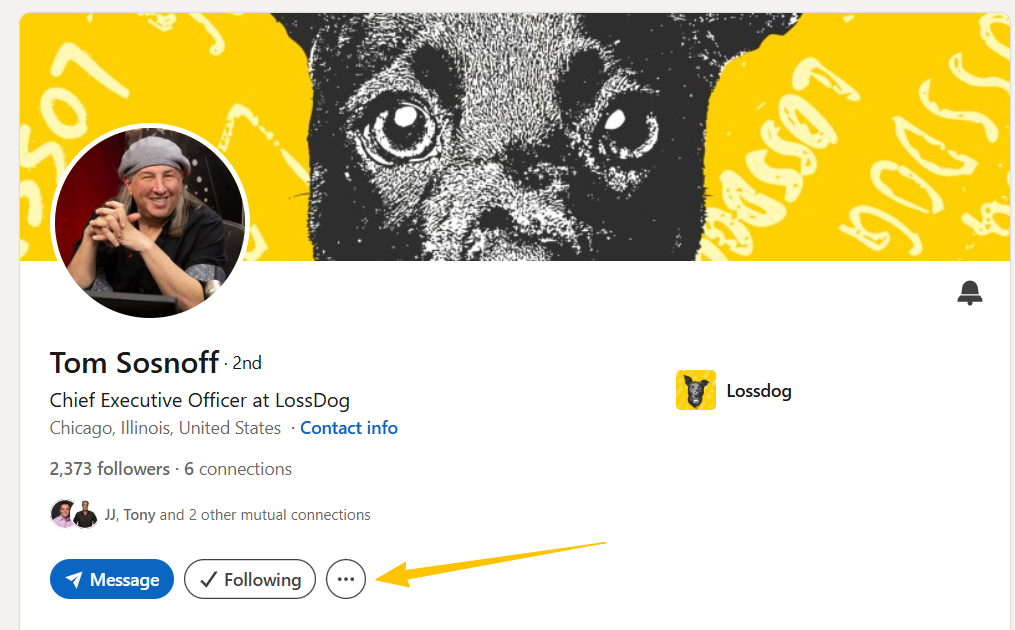
Step 1:
Locate the three dots on your LinkedIn profile page.
-
-
-
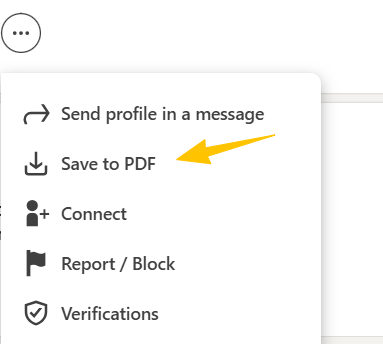
Step 2:
Click “Save to PDF.”
-
2. Understand LinkedIn’s PDF limitations:
LinkedIn’s PDF often captures only your top skills and may leave out details from your full profile. This is normal. Lossdog allows you to edit your imported resume to ensure your worth estimate is as accurate as possible. Use the edit button in Lossdog to make sure your resume is complete and up to date.
3. Upload to Lossdog
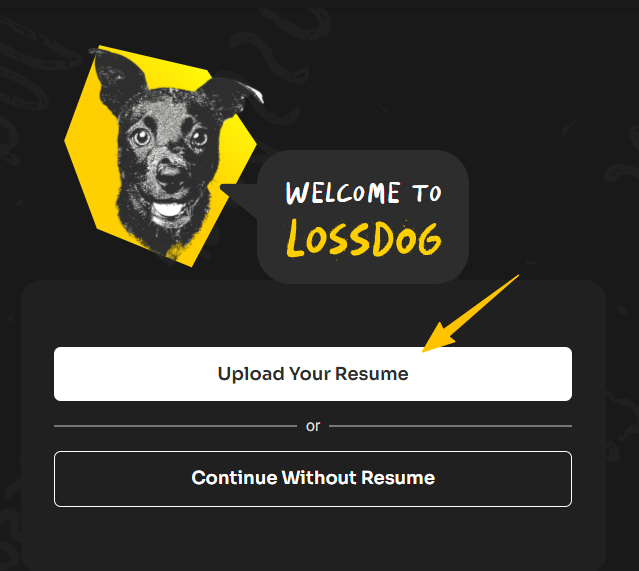
Once your PDF is downloaded, go to Lossdog and select “Upload Your Resume.” Choose the file from your device, and Lossdog will import your resume for analysis. Welcome to Lossdog — your new home where learning about your worth is fast, fun, and never a taboo.
What is Lossdog?
Lossdog is a platform that helps you understand your career value. Upload your resume and we break down your experience, skills, and achievements into a simple score that makes sense. It gives you a clear read on where you stand in the job market.
How does Lossdog calculate my score?
Your score is based on your resume, your background, and how the market values your skill set today. We analyze your experience, highlight your strengths and areas for improvement, and provide you with a number that reflects your professional position.
Who is Lossdog for?
Lossdog is built for anyone who is looking for clarity around their career and value in the present market.
This includes:
- Job seekers
- People considering new roles
- Professionals who want honest insight
- Companies that want a better way to compare applicants
What makes Lossdog different?
Lossdog is not a job board or resume builder.
We give you:
- A clean and simple career score
- A breakdown of how you stack up against others
- Insights that help you grow
- A profile that employers can understand quickly
Everything is focused on clarity, honesty, and ease of use.
What do I need to create a profile?
Upload your resume. That is enough to get started. You can add more details later if you want a deeper analysis.
What is the Digital Worth Score?
It is the number that represents your overall career strength and competitiveness. It is your professional value in a format that is easy to understand.
Does my score change over time?
Yes. Your score moves with your progress and with changes in the job market.
Is Lossdog free?
Lossdog uses a premium plan for full access. You can still view your account and your history without the premium plan, but advanced insights and updated scoring require the paid plan.
What happens if I cancel my Paid Subscription?
You keep your account and your past reports. You will not receive new breakdowns until you upgrade again.
Is my data secure?
Yes. All information is encrypted and stored securely. Your profile stays private unless you choose to share it.
Who can see my profile?
Only you. You decide when and how it is shared.
My resume did not process. What should I do?
Make sure your resume is in a supported file type and includes your work history. If it still does not load, contact support.
What if my resume does not include certain skills or details?
Lossdog can only score what is shown in your resume. If something important is missing, update your file and upload it again for a more accurate read.
Does Lossdog read my resume manually?
No. Lossdog uses automated analysis. No one on the team reads your resume unless you reach out for support and give permission.
How do I contact the Lossdog team?
Email us at [email protected]
What kind of insights will I get?
You will receive a breakdown of your strengths, weaknesses, skill positioning, and career competitiveness. You will also see suggestions on how to raise your value over time.
Does Lossdog tell me what jobs I qualify for?
Lossdog does not recommend specific job listings. Instead, it shows you how marketable your background is and what improvements create the biggest impact.
Does Lossdog use blockchain?
Lossdog uses blockchain as part of identity verification and to secure certain profile elements. This prevents tampering and ensures your credentials stay authentic.
I created an account but cannot log in. What should I do?
Use the password reset option or reach out to support for help.
Can I upload a new resume?
Yes. You can upload new or updated resumes at any time. Lossdog will use your latest version to produce your score.
Can I add portfolio links or projects?
Yes. Projects, websites, portfolios, and online work samples can all support your score and career breakdown.
Does volunteering or unpaid work count?
Yes. Relevant volunteer experience can help your score, especially if it shows leadership, consistency, or skill growth.
What if my resume is very short or I am early in my career?
Lossdog still gives you a score. Early career resumes often score differently, but the platform will show you where to focus as you grow.